GeoAgent











GeoAgent is a shared AI agent layer for geospatial Python packages, live map widgets, and QGIS plugins. With one consistent interface, projects such as leafmap, anymap, geoai, geemap, STAC, and NASA Earthdata can expose their tools to large language models, so each library no longer needs to build and maintain its own agent stack.
Built on Strands Agents, GeoAgent adds geospatial context, structured tool metadata, optional package adapters, provider configuration, and confirmation hooks that pause the agent before destructive, expensive, or otherwise irreversible operations.
See it in action:
- Short demo: QGIS OpenGeoAgent Plugin Demo
- Full tutorial: OpenGeoAgent: A Multimodal AI Agent for Automated Geospatial Analysis and Visualization
What GeoAgent Provides
- A
GeoAgentfacade around a StrandsAgent. - Provider configuration for OpenAI, Anthropic, Google Gemini, Bedrock, LiteLLM, vLLM, and Ollama.
@geo_toolmetadata for category, safety, fast-mode filtering, and optional dependency checks.- Factories for common runtime environments:
for_leafmap,for_anymap,for_qgis, andcreate_agent. - Built-in tools for live maps, QGIS projects, STAC-style workflows, Earth observation workflows, and optional geospatial packages.
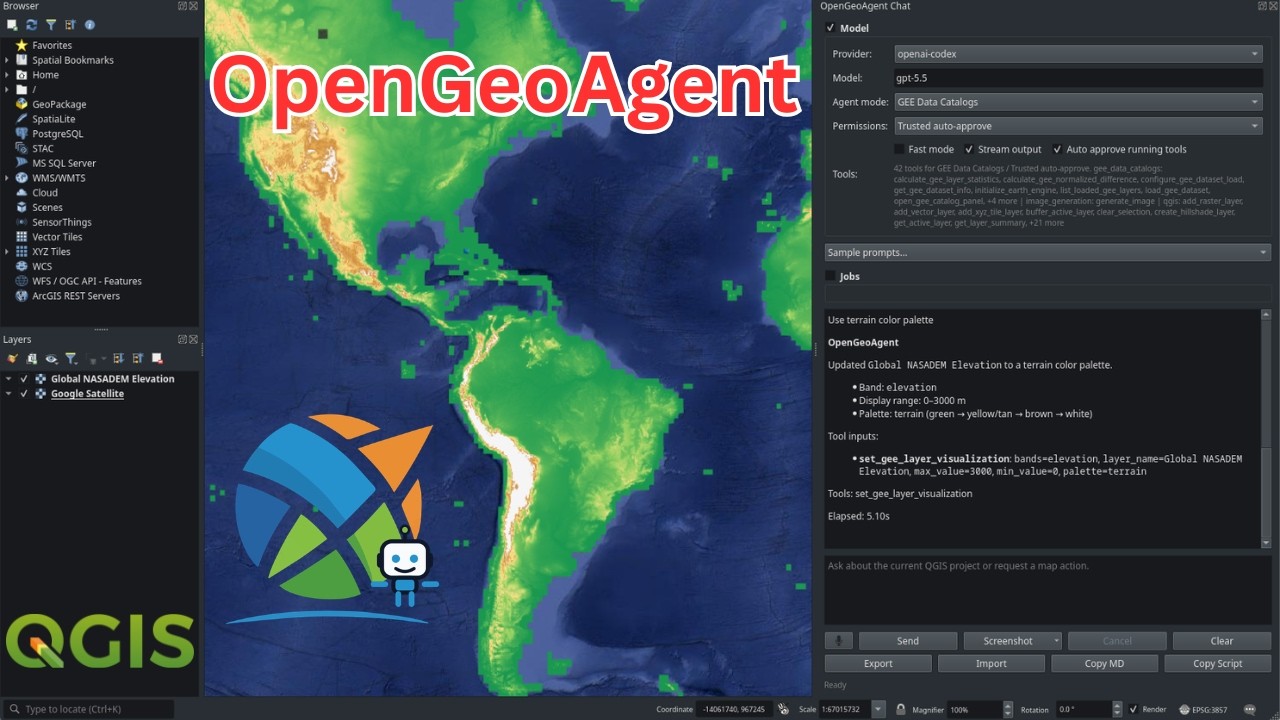
- OpenGeoAgent QGIS plugin UI with pasted image attachments, screenshot capture, image preview/save actions, transcript copying, and PyQGIS script copying.
- Confirmation hooks for destructive, persistent, or long-running tools.
- Mock map and QGIS objects so integrations can be tested without full desktop or widget environments.
Architecture
GeoAgent keeps runtime objects in Python closures and passes only structured tool parameters through the model boundary.
| Layer | Role |
|---|---|
GeoAgentConfig |
Provider, model, token, temperature, and client settings. |
GeoAgentContext |
Runtime references such as map_obj, qgis_iface, and qgis_project. |
@geo_tool |
Decorates package functions as Strands-compatible tools with GeoAgent metadata. |
GeoToolRegistry |
Stores metadata and filters tools for fast mode. |
| Factories | Bind environment-specific tools to live objects. |
| Confirmation hook | Intercepts tools that require approval before execution. |
This design keeps map widgets, QGIS interfaces, authenticated clients, and other session objects out of LLM-visible arguments while still letting tools operate on them safely.
Installation
1 | |
Install optional integrations only when needed:
1 2 3 | |
QGIS is installed separately through the QGIS desktop application or system package manager. Install GeoAgent into the Python environment used by QGIS.
Provider Setup
GeoAgent can infer a provider from environment variables:
| Provider | Environment |
|---|---|
| OpenAI | OPENAI_API_KEY, optional OPENAI_MODEL |
| ChatGPT/Codex OAuth | OPENAI_CODEX_ACCESS_TOKEN, optional OPENAI_CODEX_MODEL |
| Anthropic | ANTHROPIC_API_KEY, optional ANTHROPIC_MODEL |
| Google Gemini | GEMINI_API_KEY or GOOGLE_API_KEY, optional GEMINI_MODEL |
| LiteLLM | LITELLM_API_KEY, optional LITELLM_MODEL and LITELLM_BASE_URL |
| vLLM | VLLM_BASE_URL, VLLM_MODEL_ID, optional VLLM_API_KEY |
| Ollama | OLLAMA_HOST or USE_OLLAMA=1, optional OLLAMA_MODEL |
Bedrock is not auto-detected. Pass provider="bedrock" explicitly; it then
uses the AWS credential chain, configured region, and Bedrock model access,
with optional BEDROCK_MODEL.
vLLM support expects a running vLLM server. When using GeoAgent tools, start the server with vLLM tool-calling support enabled for the selected model and chat template.
Explicit configuration is also supported:
1 2 3 4 5 6 7 8 9 | |
Quickstart
General Agent
1 2 3 4 5 | |
leafmap
1 2 3 4 5 6 7 | |
anymap
1 2 3 4 5 6 | |
QGIS
1 2 3 4 5 | |
QGIS tools are import-safe outside QGIS and run through a Qt GUI-thread marshaller when used in QGIS.
The OpenGeoAgent QGIS plugin adds a dockable multimodal chat panel. Users can paste images from the clipboard, capture the map canvas, capture the QGIS window, select map or screen regions, preview and save attached images, copy the Markdown transcript, and copy the PyQGIS script that produced an executed result.
Built-In Tool Surfaces
Map Widgets
for_leafmap and for_anymap provide tools for:
- inspecting map state and layer metadata;
- setting center, zoom, bounds, and layer-focused views;
- adding GeoJSON, vector, raster, COG, STAC, XYZ, PMTiles, and marker layers;
- changing basemaps;
- removing, clearing, hiding, showing, and changing layer opacity;
- saving maps to HTML.
QGIS
for_qgis provides tools for:
- listing project layers and active-layer metadata;
- reading project state, layer summaries, fields, selected features, CRS, extents, opacity, visibility, and feature counts when available;
- zooming, centering, setting scale, and refreshing the canvas;
- adding vector, raster, and XYZ tile layers;
- setting layer visibility and opacity;
- selecting features with QGIS expressions and clearing selections;
- zooming to selected features;
- running QGIS Processing algorithms;
- opening attribute tables and saving projects;
- running confirmation-gated PyQGIS fallback scripts when the requested QGIS API operation is not covered by a dedicated tool.
Custom and Package Tools
Use create_agent and @geo_tool to build tools for another package:
1 2 3 4 5 6 7 8 9 10 11 | |
For integrations that need live objects, create a factory that closes over the object and returns decorated tools. See the contributing guide for a complete integration checklist.
Safety
GeoAgent tools can be marked as confirmation-required, destructive, or long-running. The confirmation hook runs before those tools execute. This is important for operations that delete layers, overwrite files, save projects, run processing jobs, call external services, or incur cost.
1 2 3 | |
Applications should usually pass their own confirm= callback that opens a
Qt dialog, notebook modal, web prompt, or CLI prompt.